Digital Doors was created as a place for me to blog and share resources that I think would be helpful for teachers integrating technology in meaningful ways in their classroom. My goal would be to write a blog post a week, but with my busy schedule, that doesn't happen. I write when I can and rely on nifty tools to help me share what I am finding when I don't have time to write.

Tuesday, October 27, 2015

Library Media Specialist Get Techy

Several of our Library Media Specialist had the opportunity to attend the Washington Library Media Association Conference this last weekend in Yakima.  After seeing a few tweets from the conference, I decided to ask our Library Media Specialist if besides all the great stories, books, and literacy, did they learn anything techish?.  

Thanks to those who have shared.  Looks like it was a great conference.  I look forward to new great ideas from our very innovative librarians as they incorporate what they learned and what inspired them at the conference.
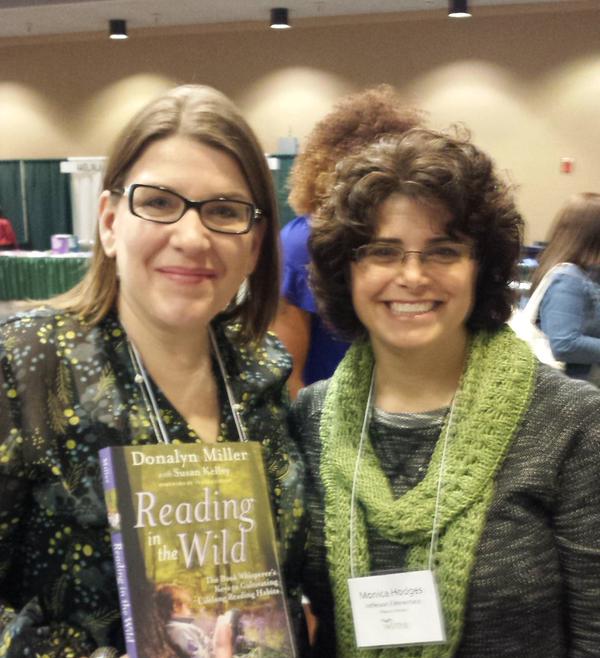
Monica Hodges from Jefferson picked up some great ideas for using Chromebooks with Destiny and Worldbook.  She also learned about a set of books called Savvy Cyber Kids that is available for free.  (I think that she learned this from her Tech Savvy daughter who is a Senior in Computer Science at the UW, but she did share this.)  And check out Monica’s Library Blog.  The Hodge Blodge. Monica regularly writes about books and other happenings in the Jefferson Library.

Jim Coldwell from Centennial is excited about setting up a Makerspace in his library media center after attending a session on the Maker movement. This is a big movement now, and it is taking root in many library media centers.  I look forward to seeing this idea grow.

Jon Sadzewicz at the high school shared about Piktochart.  Infographics are a useful literacy format and creating them is a great way for students to synthesise large amounts of information into visual and easily interpreted chunks.  There are many free tools for creating infographics.  Here are a few of those tools.

Infographics
Tools:

Estevan Vivanco at Madison Elementary learned about how to create a video news program for kids. The students create a script, then revise it and once the teacher gives it a stamp of approval, they record the news interview with a camera.  Students can have access to great lighting and even a green screen and their teacher can edit the video and make it look professional!  The presenter at the workshop also showed some ways to make a cool intro with news-program-sounding music.  Might be a fun thing to try in Mount Vernon!

Dale Fournier at Washington shared that she went to a great session on jazzing up a library website making it more informative, and inspiring for students.  She plans to try a tool called Library Thing to suggest new books to students.  A few other additions to add to a library webpage are One Click Digital and Tumblebooks of the Day.

Eva Greenwald was excited to learn more about Destiny, some great tips about incorporating tools like Screencasting, Photostory, Live Binders, Symbaloo, Voki, and Smore into her lessons and she is interested in exploring the idea of using a service such as One-Click Digital to provide audio book access to our students. (Student's currently have access to this with a Public Library card, but if this service was available in the schools, it could be managed through Destiny. Some neat possibilities.

Our Library Media Specialist are such great resources for our students and teachers. We remember that they know books, but we sometimes forget they they also have a lot of great information on other learning resources and they are happy to share not only the very best book ideas, but also great ideas and resources for research, literacy and more.

HInt How to get the most out of a conference you didn’t attend.

  1. Have those that go share a Google Doc and keep collaborative notes that can be shared with others.
  2. Find out the Twitter HashTag for the Conference and follow the discussion online.
  3. None of this is the same as being there and making face to face connections, but it does open the door to a lot of great resources and free learning.  
Pin It Now!

Wednesday, October 14, 2015

A Few of My Favorite Reads


As a part of my job as a Digital Literacy Specialist, and well really as a teacher, I am constantly reading and learning new things from a variety of sources.  I do my best to share some of what I learn with you.

I use a tool called Feedly to gather the blogs I read into one place so that I can easily sort through and find information to share.

I thought I'd quickly share a few blogs that I enjoy and learn from frequently.

Richard Byrne at http://www.freetech4teachers.com/ shares great resources daily.  He reviews new tools and shares tutorials he has created to show teachers how to effectively use the tools in their classroom.

Alice Keeler at http://www.alicekeeler.com/teachertech/ appeals to my Googly and nerdy side.  She shares great ideas for using Google Apps for Education in your classroom and the coolest part is that she creates and shares her own scripts to add even more functionality to Google Apps.

George Couros shares at The Principal of Change http://georgecouros.ca/.  He is a principal at a school in Canada.  He always has challenging ideas about how to make schools and teaching better.

I'll stop there for now and share more later.

I encourage you to use a tool such as Feedly and to start gathering a library of blogs that you enjoy and find informative.  (They don't all have to be school related.) Pin It Now!

Beware the Transformation Trap

A few weeks ago, I had the opportunity to watch Jennie Magiera's Keynote Speech from CUE 15 online.  I love sharing videos, but this one is about 45 minutes and I struggle to get people to find the time to click a link much less sit down and watch a 45 minute video, but as I watched this video, I wished that my local teaching friends could all hear Jennies speak.  Jennie is a 4th and 5th grade teacher who works with students in an impoverished area of Chicago.  She has built such an amazing relationship with her students and with her teaching style and passion, she has empowered her students to use technology in truly transformational ways.  The activities she does with her students truly show a redefinition of learning.  Not only is she using tools such as Skype and Twitter to help her students have a voice that reaches beyond the classroom, but she has empowered her students with the ubiquitous use of technology in her classroom.  The tools and resources are very much in the background.  The tools are not the important piece, just as we don't think much about a pencil when we pick it up to write, these students don't think much about the tools they are using, they think about the actions they are making by using the technology.  As I said, the video is long, but it is very entertaining and inspiring.  The use of tech doesn't have to be elaborate or hard to be effective.  Students just need to know about and have permission to use the tools available in empowering ways.


How can you expand your students world beyond their classroom? Pin It Now!

When Resources are Sparse, Think Redefinition

Photo by https://www.flickr.com/photos/mobilestreetlife/
Yesterday I had the opportunity to send out notifications to another round of Early Tech Adoption Team Grant recipients. It is fun to see the responses of those who have received the grant and really hard for me to send the messages to those teams who will need to continue to wait. Due to the nature of the levy, money rolls in over a three year time frame and not all at once. Thus the need for a roll out model and the reality that some teams will have to wait longer that they would like. For this levy we chose an Early Tech Adoption model that encourages those who are ready, to make a plan, participate in team directed professional development and share their experiences with others. It is our hope that with this model, when teams receive their technology, they will already have a plan in place and be ready to start learning and then sharing with others. By the end of this year, we will have placed 28 mobile carts with teams across the district. That is 840 student devices! And the response so far... MORE!!!! We need MORE and we need it NOW! Once teachers get a taste of what can happen when students have more ubiquitous access to devices, they really have a hard time with the idea of sharing one cart with a whole team of teachers. The uses of technology changes when students and teachers have regular access to student devices. So as exciting as it is to roll out these carts and build more and more access for our students, it is also important to note that even though the district is moving in the right direction at speedy and steady pace, we still are in a relative desert to what could actually be utilized for our students. So, with that in mind, we need to be mindful of making the best use of these valuable resources. Sure, there are many great, engaging and in some cases, time saving ways that we can use these devices in our classrooms, but with the resources being limited, it is valuable to plan to use technology that allows you to do things you could not do without the technology. Dr. Ruben Puentedura has developed a model to help teachers identify effective and transformative uses of technology in the classroom.   The SAMR model divides activities into four categories with Substitution being the most basic (and the one most often seen in classrooms,) and Redefinition being the most transformative.  With redefinition, the lessons you design uses technology in a way that allows you to do something you could not do without the use of technology.  Take a look at this video to learn more about the SAMR model.


It is important to note that teaching "below the dotted line"  is not a bad thing.  It is a progression. The SAMR model is a great tool for reflecting on lessons and planning new activities.  Where do your activities fit?  If they all seem to be Substitution and Augmentation, try stretching your thinking and redesigning the lesson with the capabilities of the tech in mind. What more can you do now that you have technology?

"Technology is not a panacea. Not all technology is good for pedagogy. And great pedagogy can and will exist without technology. We have, however, greatly miscast and underutilized technology’s power. When we enlist technology in the service of exploratory learning for all, watch out! On the other hand, if we plod along with standards and assessment using technology only as a prop, we will get what we deserve: a higher level of tedium.” Michael Fullan “Stratosphere: Integrating technology, pedagogy, and change knowledge.” p. 78

And for those of you who are interested in learning more about how to use technology in ways that goes beyond just substitution, I have a Cloud Academy Class just for you. Pin It Now!

Tuesday, September 29, 2015

Sharing our Story in 15 Seconds

More and more, schools are seeing Social Media tools such as Twitter, Facebook and Instragram as effective tools for communicating and sharing their story with the community.  While in the classroom, we still tend to see Social Media as a distraction and possibly even a danger for our students. Recently, I saw a quote from a student on George Couros' blog that said,


"Social Media is like water. It is all around us, you can let us drown or you can teach us to swim." 
We need to teaching and modeling the proper use of social media so that our students can indeed swim to success.  One way to do this, is to jump in as teachers and schools and use Social Media as a place to put our best foot forward for our community to see.

In her blog Langwitches, Silvia Rosenthal Tolisano has a series of articles on using Social Media in powerful ways in school.  She shares of an exercise she did with educators where they had to create a 15 second video sharing the story of your school.

Challenge: Tell Your School or Classroom Story in 15 Seconds

An Instagram Video is 15 seconds.  I challenge you to share the story of your school or classroom in a 15 second Instagram video and then tag the video with #mvsddigital. This is a positive way for us to brag on the great things happening in our district.  Let's see if we can get at least one video (and hopefully more) from each school in the Mount Vernon District.  You can share your classroom story or your school story.  You can do it all by yourself, or you can enlist some colleagues to team with you. These videos will be posted to our Digital Literacy Google+, Twitter and Facebook pages oh and of course on Instagram.  (Have you liked or joined these groups?)


By the way, I recently had to sit through a 13 minute video telling the story of a district in our state.  Great district, but 13 minutes was too long to hold my interest.  You can get a much bigger bang for your buck if you practice your summarizing skills and keep it short and sweet.

Using Instagram in the Classroom
Social Media FOR Schools

When sharing photos or work of students.  Please be sure to check that their parents have not opted out of publishing student work. 
Pin It Now!

A Very Smart Sidekick


This year, as I have visited schools, you might have noticed that I have a sidekick with me.  She is no ordinary sidekick, she is a very smart and talented sidekick and I am thrilled to be learning with Dr. Paula Dagnon at my side for the next two quarters.  Paula is a professor of Instructional Technology at Western Washington and she has chosen to work and learn alongside of me for her sabbatical.  This is a great win for the Mount Vernon School District as she has a lot to offer as we move forward with integrating technology in meaningful and transformative ways.   She and I brainstorm, plan and problem solve together.  Actually having my own PLC has been extremely helpful.  Paula digs in and helps in anyway I ask.  Currently, she is working on updating the iPad lessons that are used by specialist in some of our elementary schools.  We are also doing drop in visits at all of the schools and working with the teams of teachers who have received technology through the Early Tech Adopter Team Grants. Paula's is interested in learning all of the struggles and celebrations of teaching with technology in the K-12 environment so that she can better prepare her students at the university level.  So when you see Paula, be sure to give her a warm welcome and perhaps invite her into your classroom to show her how tech is being used in the Mount Vernon School District.  
Pin It Now!

Googling my Weekend Away


This weekend I had the opportunity to present at the AppsEvent Seattle Summit Featuring Google For Education.  It was great to learn, be inspired and share with so many educators using Google from around our region and even around the world.  I picked up a few new tips and tricks that I am excited to use and share with others.  It is exciting to see how responsive Google's education team is to teachers and how they continue to tweak and improve products to help teachers and students.

Allison Mollica with AppsEvents shared a newsy presentation about several of the new features in Google Apps for Education.  She is one of my tribe who believes that there is power in sharing so she has given me permission to share her presentation here.


Another common theme throughout was the idea that Google Apps are just tools, what can make them amazing, or not so amazing, is how they are used.  Just by using Google Apps or other tech, does not mean that your students are getting a huge learning impact.  But when tech is used with good pedagogy, amazing learning can happen.

It is important for us to build our tool box of available tools and learn to use these tools well.  It is really fun when we get to the point where we can mash up the tools like a wonderful recipe for learning, using a dash of one tool and a cupful of another tool.  But all of this is even more amazing when we attach this engaging tech to great pedagogy and purpose.  Keep your goals in mind and don't get swept away in a sea of tools and apps.

Here is a link to the three presentations I did.  All three focused on using different types of tools for instruction, assessment and feedback.

Pin It Now!

Thursday, September 17, 2015

Early Tech Adopter Team Grants To Be Reviewed Oct. 1st.


Tech Levy funds were used to place 13 carts of mobile devices for use with grade level (elementary) and content area (secondary) teams throughout the district.  As funds for the three year levy roll out, we will continue to place technology in teams where teachers have shown that they have developed a plan for use, for sharing and for professional development. Several Early Tech Adopter Grants have already been written and are ready for the process to begin.  We will be reading grants for the second distribution round on October 1.  If your team has already completed and turned in your grant, you may want to revisit it before that time to make sure all of the information still applies to your current needs and plans.  If you are thinking about getting a grant ready to be read, this is your heads up that the next reading will be happening in a few weeks.  
To find out more about the reasoning behind the grant process, and to access the grant, Please click on this link.   Pin It Now!

Friday, September 4, 2015

9-4-15 Fresh Start and New Ways to Learn

We are off to a great start in the Mount Vernon School District.  Students are excited, and teachers are ready and set for a super year.  That is one thing I love about teaching.  Every year, we get to start fresh.  We've reflect on what worked, we challenge ourselves to try new things and we dive in to another year of learning.  As you can see in the Doc below, we've created lots of ways for you to stay in the know about all things Digital Literacy in the district.  I certainly don't expect you to frequent all of these avenues, but hopefully, you will pick an avenue that fits into your style and be able to keep up to date and perhaps even share cool things that are happening in your classroom with others.

Challenge! 

To get us rolling, I am going to offer a series of challenges each week.  Those who participate, will be entered into a drawing for a small, but exciting prize.

This week's challenge is to Like our Facebook Page.  Now if you have chosen not to be on Facebook, I will tell you that the chance of the small, but exciting prize will not be worth your effort.  Just wait until the next week and maybe you will find something more up your alley.  But, if you are someone who regularly checks Facebook, "liking" our page might prove to be the best way for you to receive tips and useful tools, Instagram photos from around the district and links to blogs written by other teachers in our district.

Just click this link and hit like and you are connected!

Like Mount Vernon Schools Digital Literacy on Facebook. 

For those 74 of you who have already liked the page, you are in the drawing as well.  :)


Here are some other ways to get connected.


Ready for more tech in your classroom?  Get your grade level or content team together and check out the MVSD Early Tech Adopter Team Grants.
Itching to learn new things?  Of course you are!  Check out the MVSD Digital Literacy Workshop Cloud Academy.  Set your own pace, try out new things and reflect on learning.  Earn clock hours in the process.
Mount Vernon Digital Literacy Facebook Page:  Join to get updates, resources and celebrations of all the great things happening in our district.
Follow @MVDigital on Twitter:  Pretty much the same info, but for the Twitter crowd.
If you are interested in Pinteresting, check out the things I am pinning on Pinterest.
Join our community on Google+ to get updates, news, ask questions and share learning celebrations.  
You must be logged in to Google+ in MVSD320.org.  Search for MVSD Digital Literacy Professional Development or try this link.  https://goo.gl/Y4tzlT
Not into Twitter and Facebook  (for work) quite yet?  Check out my blog, Opening Doors to Digital Learning or our new Digital Literacy Workshop blog which will (hopefully) have contributions from teachers learning and doing cool stuff with tech throughout the district.
Digital Literacy Workshop Blog http://mv-digitalliteracy.blogspot.com/
Opening Doors to Digital Learning: http://digital-doors.blogspot.com/
Check out Mount Vernon Digital on Instagram.  My goal is as I am moving throughout the district to snap some of the cool and interesting things I see happening in teaching and digital literacy throughout the district.
If you are on Instagram, you can join in the fun by snapping photos and videos that show the spirit of learning in our district share with the hashtag #mvsddigital,  (Please be mindful when publishing photos of students that they have not opted out of being published.  Don’t caption pictures or videos with student names.  Just share what is happening. )


Pin It Now!

Saturday, August 1, 2015

DLW Cloud Academy 2015-16 Digital Citizenship

I've completed another lesson for our cloud academy. Hoping to have several more courses done by the end of the summer. Everyone is welcome to review the resources. MVSD teachers can register, participate in the activities, take a quiz and earn clock hours. Pin It Now!